Blog · 12 Nov 2026
Collective agreement rules in time tracking: pay types straight from clock-ins
Counting hours is easy. Interpreting the collective agreement is the work that takes the payroll administrator hours every month. The Leimauslaite.fi app does the interpreting for you: you choose the collective agreement, and pay types are calculated straight from clock-ins.
What does collective agreement interpretation mean?
Working-time records tell you how many hours each person worked. Payroll, however, needs pay types: regular working hours, overtime at 50% and 100%, Sunday and public holiday work, and the collective agreement's evening, night and Saturday supplements. Each collective agreement defines them slightly differently – in retail the evening supplement starts at 18:00, in construction at 16:00, and in social services the supplement is a percentage rather than euros.
The app splits each entry into days and times of day, applies the rules of the selected collective agreement to every hour and compiles the result into pay types by employee. Behind every row you can see the entries it was generated from.
How to start using collective agreement rules
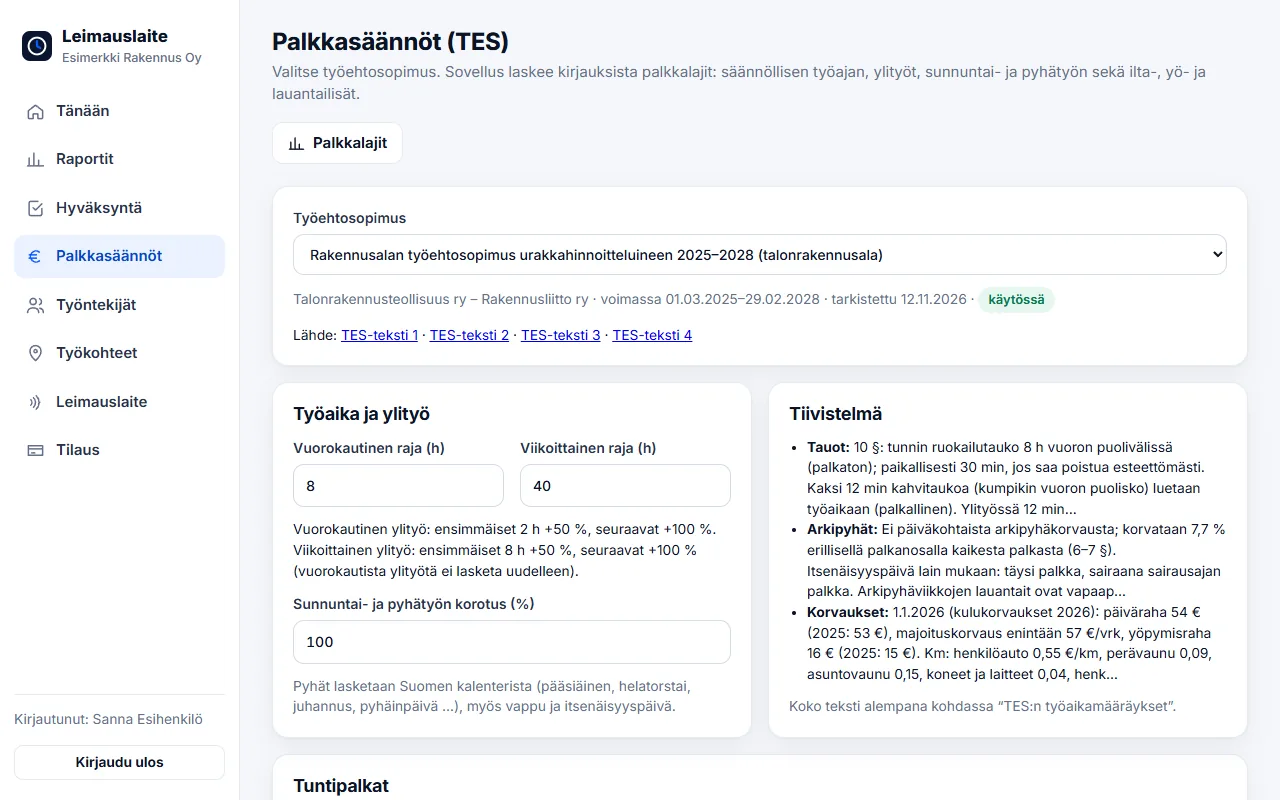
- Choose a collective agreement. Open Pay rules and choose your collective agreement from the list. You can choose from the 20 most popular collective agreements and the Working Hours Act alone.
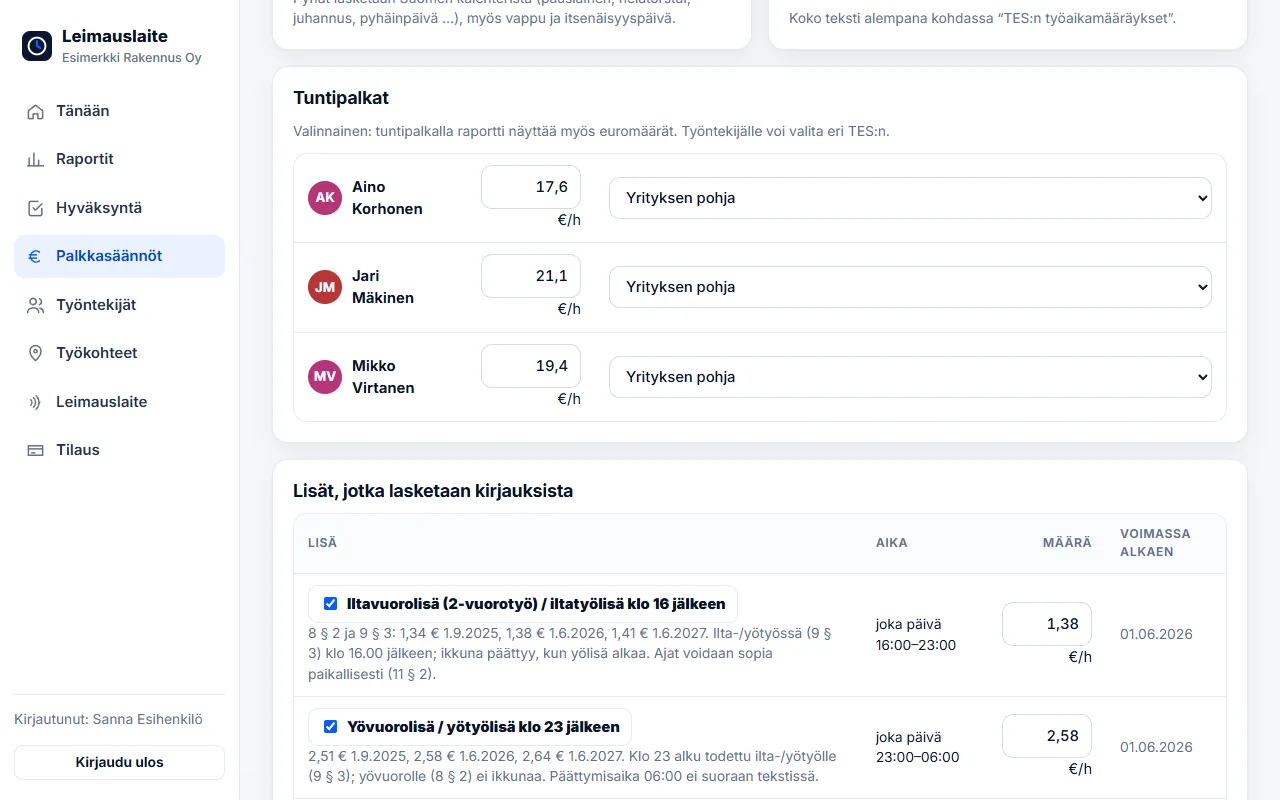
- Check the figures. You will see the limits of regular working hours, overtime tiers, the Sunday increment and all time-of-day supplements with their euro amounts. You can change the euro amounts, switch supplements off or add your own locally agreed supplements.
- Add hourly wages (optional). With an hourly wage, the report also shows euro amounts. You can also choose a different collective agreement for an employee than for the company.
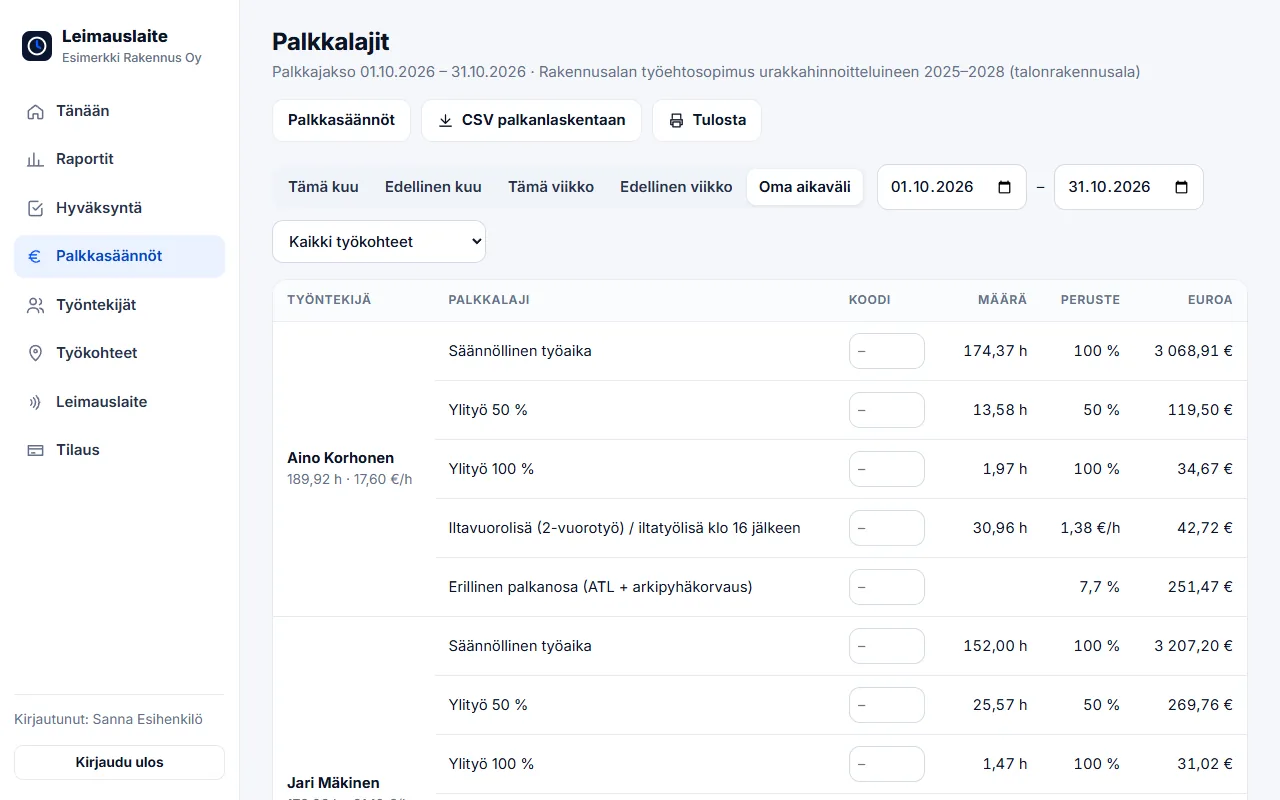
- Open pay types. Reports → Pay types shows the period's pay types by employee. The CSV file goes straight to payroll or your accounting firm, and your own pay type codes are entered only once.
What is calculated automatically?
- Regular working hours and daily and weekly overtime in the collective agreement's tiers
- Period-based work (e.g. MaRa, security, transport): overtime for hours exceeding the period's hour limit
- Sunday and public holiday work – Finnish church holidays, May Day and Independence Day are taken from the calendar
- Evening, night and Saturday supplements by time of day, also in shifts continuing overnight
- Percentage-based pay components, such as the separate 7.7% pay component in construction
Personal and situational supplements, such as a vocational qualification supplement, working conditions supplement or call-out pay, are shown in the template for information. They are entered in payroll, because they cannot be inferred from a clock-in.
Is your collective agreement missing?
We add new collective agreements at customers' request. At the end of the Pay rules page there is a Request it button: enter the name of the agreement and a link to its text, and we will review it and let you know when the template is available. In the meantime, you can use the closest template and add your own supplements manually.
Available collective agreements
- Collective agreement for the retail sector (and pay appendix 1.5.2025–31.1.2028)
- Collective agreement for employees in the technology industry
- Collective agreement for the construction industry, including piecework pricing, 2025–2028 (house building)
- Collective agreement for employees in the property services sector
- Collective agreement for the tourism, restaurant and leisure services sector – EMPLOYEES
- Collective agreement for the private social services sector
- Collective agreement for the health services sector
- Collective agreement for the truck sector
- Collective agreement for warehouse terminal and port workers in the freight forwarding sector
- Collective agreement for the security sector
- Collective agreement for the HVAC sector of the building services industry
- Collective agreement for the electrification and electrical installation sector
- Collective agreement for the painting and floor covering sectors, including piecework pricing (replaced the collective agreement for the painting sector, including piecework pricing, 1.3.2025–29.2.2028 from 24.10.2025)
- Collective agreement for the infrastructure sector
- Collective agreement for the building products industry
- Collective agreement for the basic chemical industry (workers)
- Collective agreement for the food industry
- Collective agreement for the joinery industry (used as the 'Wood products industry collective agreement' option)
- Collective agreement for automotive retail and repair
- Collective agreement for bus personnel
- Working Hours Act (no collective agreement)
See the supplements compared: Evening, night and Saturday supplements 2026 – 20 collective agreements.
FAQ
Which collective agreements are available?
You can choose from the 20 most popular collective agreements, including those for retail, construction, property services, hospitality (MaRa), the technology industry and private social services, as well as the Working Hours Act alone.
Can I change the collective agreement's euro amounts?
Yes. Euro amounts, overtime thresholds and the Sunday increment can be edited, supplements can be switched off and you can add your own supplements. The changes are saved for your company.
What if our collective agreement is missing?
The Pay rules page has an "Is your collective agreement missing?" form. Enter the name of the agreement and a link to its text, and we will add the template.
Read also
- Approving and locking working hours: how to close a period correctly
- Calculating overtime and Sunday work under the Working Hours Act – examples
- Evening, night and Saturday supplements 2026: 20 collective agreements compared
- Email reminders and invitations: a forgotten clock-in no longer surprises you on payday
- Annual leave accrual and flexitime balance: how the app calculates them by law
- Part-timers, additional work and mid-week public holidays: working hours per employee
- Old timesheets, opening balances and support: how to switch time tracking systems
- Clocking in with phone NFC, five languages and a login for your accounting firm
- Shift roster under the Working Hours Act: create, publish and compare with actual hours
- Building-site personnel list and employee report to the Finnish Tax Administration directly from clock-ins
- Mileage allowance and daily allowances 2026: trips and expenses in time tracking
- Kiosk mode, projects and billing by site – and security in order
- Time tracking in staffing: hours by client for billing and payroll
- Time tracking in construction: Valtti card, building sites and the construction collective agreement
- Time tracking in cleaning: NFC tags at sites and hours by site
- Time tracking in property maintenance: tags in properties and on-call duty made visible
- Time tracking in retail: evening and Saturday supplements under the retail collective agreement
- Time tracking in restaurants: night shifts, period-based work and the MaRa collective agreement
- Time tracking in care and home services: percentage supplements and public holidays done right
- Time tracking in industry and warehouses: shifts, overtime tiers and collective agreements
- Time tracking in the office: flexitime, remote days, leave and the accounting firm
- Time tracking in transport and logistics: period-based work and terminal shifts
- Time tracking in security services: night shifts, public holidays and period-based work
Try it for free – 1–3 employees always free of charge
Add employees and work sites, choose the entry method and the hours start adding up. No card details, no commitment.