Time tracking for cleaning – hours by site
A cleaner may have five sites in a day. With the time card on the phone or text entry, each site is recorded separately, and the billing report is ready.
- 1–3 employees free
- No card details
Sound familiar?
- Hours per site are hard to compile for invoicing
- Part-timers' and shift hours get mixed up
- Paper timesheets get lost
How it is solved
- The employee selects the site and presses Start – and again at the next site
- Alternatively, times as text in the evening: 8-10 Site A, 10.30-12 Site B
- The supervisor sees in real time who is at which site
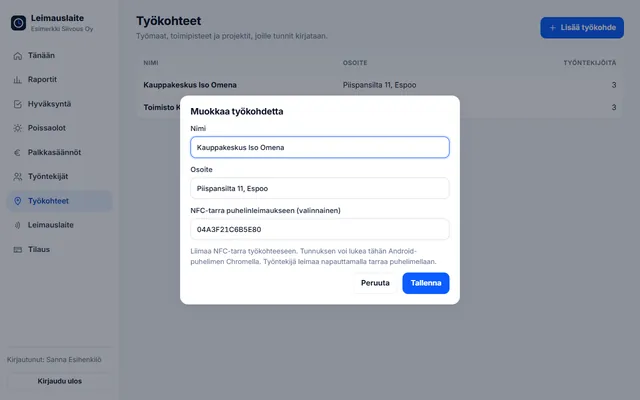
- NFC tag at the site: a tap with the phone starts and stops
- Report by site for invoicing, evening and night supplements according to the property services collective agreement
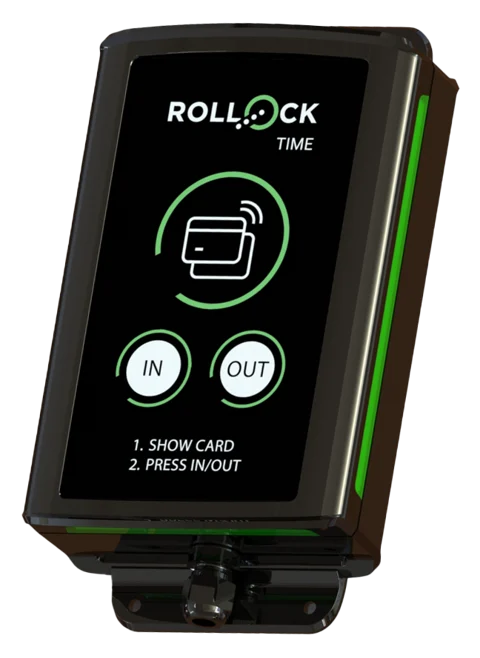
We recommend: the time card on the phone. A separate punch clock can be added to a large site, such as a shopping centre.
What cleaning needs
An NFC tag at every site
The cleaner taps the site's tag – work starts at the right site, and the site cannot be selected incorrectly.
Many sites a day
Each start and stop is assigned to a site. Report by site for invoicing.
Five languages
The view and messages in, for example, Ukrainian, Estonian or Russian – fewer errors and questions.
Property services collective agreement
Evening (18–23) and night supplements (23–06) as well as Sunday and public holiday work as pay types.
Forgotten clock-out
An email reminder is sent if a clock-in has been left open for more than 12 hours.
Part-timers' annual leave
Leave accrual also by the 35-hour rule when the 14-working-day rule is not met.
A typical day
A cleaner starts the morning at an office site and taps the NFC tag stuck inside the front door. At ten she moves to a shopping centre and clocks in there straight away. In the evening the supervisor sees at which sites hours were accrued, and at the end of the month the billing report is ready by site – payroll receives the evening and night supplements directly.
Collective agreement built in
Choose the collective agreement and pay types are calculated from the clock-ins. The euro amounts can be edited. Read about collective agreement rules.
Collective agreement for employees in the property services sector
01.04.2025–31.03.2028 · Overtime over 8 h / day and 40 h / week · Sun/public holiday +100%
- Evening supplement (other than regular shift work): €0.73/h (every day 18:00–23:00)
- Night supplement (other than regular shift work): €1.36/h (every day 23:00–06:00)
Try it yourself – click to start work
The real app with sample data. Switch roles in the top bar and view the report by employee and by site.
The demo runs only in this browser, and no data is sent anywhere. Open the demo full screen →
Questions: cleaning
Can several sites be recorded for one day?
Yes. Each start and stop is assigned to the selected site, and the report breaks down the hours by site.
Does every cleaner need their own phone?
The app works in a browser on the employee's own phone. If there is no phone, a punch clock can be installed at the site.
Other industries:
Try it for free – 1–3 employees always free of charge
Add employees and work sites, choose the entry method and the hours start adding up. No card details, no commitment.