Leimauslaite
Key to the reader, IN or OUT
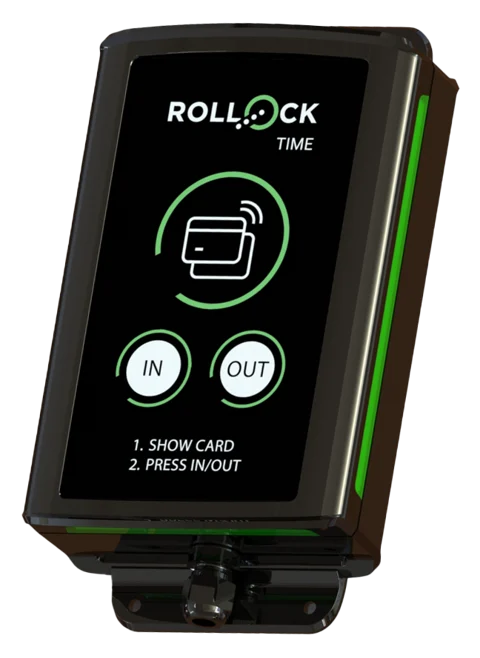
The employee shows an NFC key fob or Valtti card and presses IN or OUT. Suitable for building sites, warehouses and production.
Read more – Punch clock →Finnish punch clock and app
Employees clock in with an NFC key fob at the punch clock, tap Start on their phone or type their times as free text. You get working-time records that comply with the law and a payroll report at the click of a button.
The entry method is chosen per employee. A punch clock on the building site, the phone on customer visits, free text at the office – all hours in the same report.
Leimauslaite
The employee shows an NFC key fob or Valtti card and presses IN or OUT. Suitable for building sites, warehouses and production.
Read more – Punch clock →Time card on your phone
The employee selects a work site and taps Start – or taps the work site's NFC tag. Works on Android, iPhone and computers.
Read more – Time card on your phone →Free text
7.30–16 lunch 30 min is enough. The app recognises times, breaks and the site and calculates the hours for you.
Read more – Free text →Clock in by phone or computer, hours and reports in the browser. No hardware to buy – start for free right away.
Start for freeWhen several employees arrive at the same place, add a 4G punch clock to the wall. Price from €975 + device fee €10/mo – you can also buy it later.
Explore the punch clockThis is the real app with sample data. Switch roles in the top bar: as a supervisor you see the reports and the punch clock, as an employee the Start and Stop button.
The demo runs only in this browser, and no data is sent anywhere. Open the demo full screen →
New
Hours are checked, approved and locked – and pay types are calculated according to the collective agreement you choose.
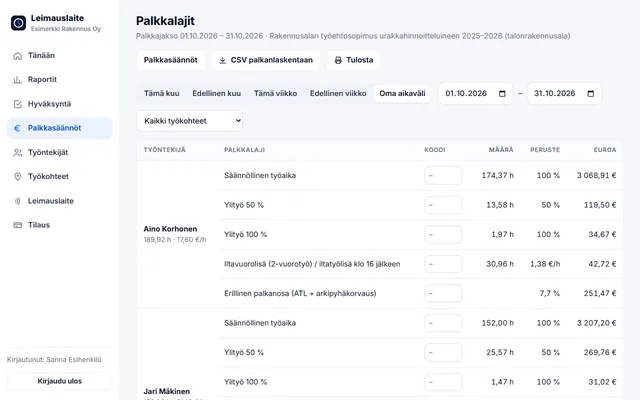
Choose from the 20 most common collective agreements. Overtime, Sunday and public holiday work, and evening, night and Saturday supplements are calculated from the punches – CSV for payroll. You can request a missing collective agreement.
Explore collective agreement rules →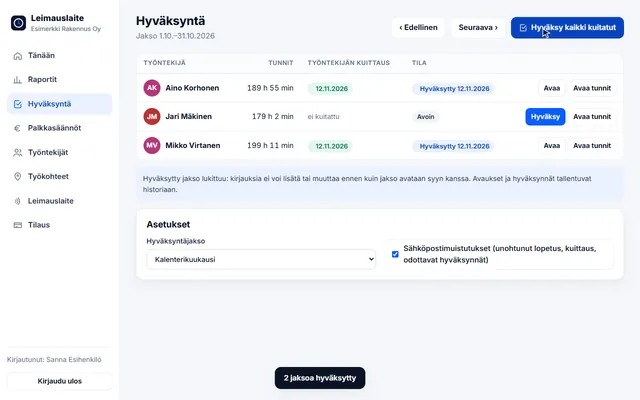
The employee confirms their hours, the supervisor approves them and the period is locked. Email reminders flag forgotten clock-outs and pending approvals.
See how it works →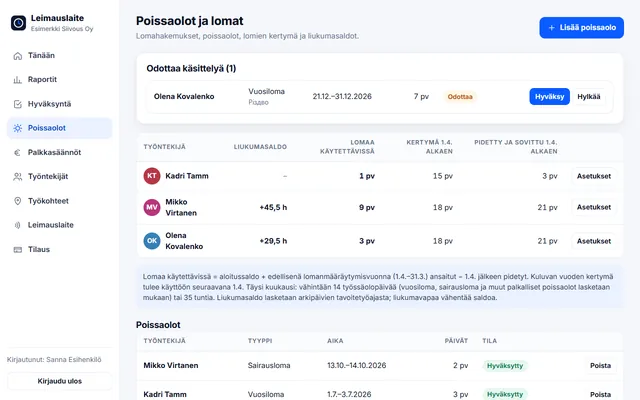
Leave accrual under the Annual Holidays Act, leave requests by phone and a flexitime balance within the limits of section 12 of the Working Hours Act (+60 h / −20 h).
Read how it is calculated →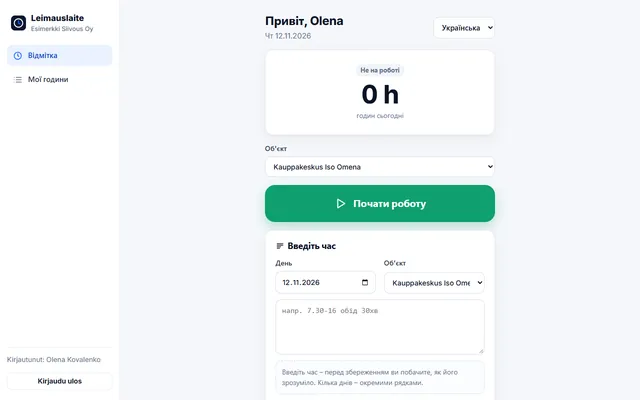
Clock in by tapping the work site's NFC tag with an Android phone. Employee view in Finnish, English, Estonian, Russian and Ukrainian. Read-only login for your accounting firm.
Explore →The same app shows each of them exactly what they need.
Supervisor
Employee
Rollock TIME punch clock
The Finnish 4G punch clock terminal needs only power and a SIM card. Punches are sent to the app in real time – no cabling, Wi-Fi or computer needed. The device is an add-on: the app works without it, and you can get the device later.
Building site, warehouse, customer premises or restaurant kitchen – choose your industry and see how hours are recorded in a business like yours.
Punch clock in the site cabin, Valtti card as the key and hours per building site.
Read more →Many sites a day – hours per site for invoicing.
Read more →Maintenance workers' hours per property – by phone or as text.
Read more →Part-timers' shifts and hours right – clock in in the back room.
Read more →Evenings, overnight shifts and Sundays itemised.
Read more →Mobile work hours per customer visit by phone.
Read more →Dozens of punches with a key at shift change.
Read more →Flexible working hours, remote days, leave and your accounting firm in one place.
Read more →Period-based working time, drivers on the road and terminal shifts.
Read more →Night shifts, public holidays and period-based working time – clock in with the site's NFC tag.
Read more →Temp workers at many clients – hours per client for invoicing and payroll.
Read more →Heavy systems do everything from payroll to recruitment. We do one thing well: working hours, right and easy.
A real-time view of all employees and sites.
Hours are allocated to a building site, customer or project – report ready for invoicing.
Changes are saved with reasons, and the original punch remains visible.
Email reminds about forgotten clock-outs, the employee confirms their hours and the approved period is locked.
Overtime, Sunday work and evening, night and Saturday supplements according to the chosen collective agreement – CSV for payroll.
Daily hours, Sunday work and estimated overtime itemised for every employee.
Most of our customers switch from paper timesheets or spreadsheets. Onboarding usually takes less than an hour.
“We used to collect timesheets on Fridays and fix them in Excel. Now the hours are ready when payroll is run.”
Sample quote – to be replaced with real customer feedback before publication.
All entry methods on all plans. No setup fee, no commitment, no per-feature pricing.
1–3 employees
Always free, no card details
4–15 employees
excl. VAT · or €290/yr (2 months free)
16–50 employees
excl. VAT · or €690/yr (2 months free)
51–150 employees
excl. VAT · or €1,490/yr (2 months free)
Prices excl. VAT. Punch clocks and key fobs sold separately – see the full price list.
A punch clock is a wall-mounted terminal where employees record the start and end of work by showing their own NFC key fob or Valtti card and pressing IN or OUT. The punch is sent instantly over the 4G network to the time tracking app, where the hours are visible to the supervisor and for payroll.
You don't need one. The app works entirely in the browser: employees clock in with their phone (Start–Stop) or type their times as free text. You can buy a punch clock later if the need arises. A punch clock works best where several employees arrive at the same point, such as building sites, warehouses and production.
An employee types, for example, Mon 7.30–16 lunch 30 min Site A. The app recognises the day, times, break and site, calculates the hours and shows its interpretation before saving. Try the parser.
Yes. The device uses the company's own 4G data subscription with the PIN request disabled. Punches use very little data, so an inexpensive data plan is enough.
1–3 employees is always free. Plans start at €29/mo (4–15 employees), excl. VAT. The punch clock is optional (from €975 + device fee €10/mo, on paid plans). See the price list.
Yes. The report shows hours worked per employee and per day, with Sunday work and estimated overtime itemised, and supervisor corrections are shown together with the original punch and the reason. Read more about the requirements for working-time records.
About us
Leimauslaite.fi's developer Janne Halttu spent eight years as a salesperson and developer of Tuntinetti.fi time tracking and carried out hundreds of rollouts, from five-person companies to organisations with more than 500 employees. The result is a refined and more user-friendly time tracking system: the same or broader features at a lower price – with additions based on customers' wishes.
Add employees and work sites, choose the entry method and the hours start adding up. No card details, no commitment.