Time tracking app for Android, iPhone and the browser
Time card on your phone, free-text entry and NFC punch clock in the same app. The supervisor adds employees and work sites – the hours are calculated automatically.
- Free for 1–3 employees
- Works in the browser – no device required
Try the app – click to start work
This is the real app with sample data. Switch roles in the top bar: as a supervisor you see the reports and the punch clock, as an employee the Start and Stop button.
The demo runs only in this browser, and no data is sent anywhere. Open the demo full screen →
Type working hours freely – the app understands
Not everyone wants to press buttons. With free-text entry, the employee types the times as they come to mind, and the app recognises:
- times in the format 7.30, 07:30 or 0730
- breaks: lunch 30 min, break 0.5 h, -30min
- weekdays and dates: Mon, 11.11.
- several periods per day and night shifts
- the work site or a note
Before saving, the employee sees the interpretation and can correct it. Try it here – nothing is saved.
Employee settings: entry method, work sites and key
Three things are chosen for each employee – nothing else is needed.
Entry method
Punch clock, time card in the app or free text. You can allow one or more.
Work sites
Building sites, locations or projects the employee is allowed to log hours to.
Key ID
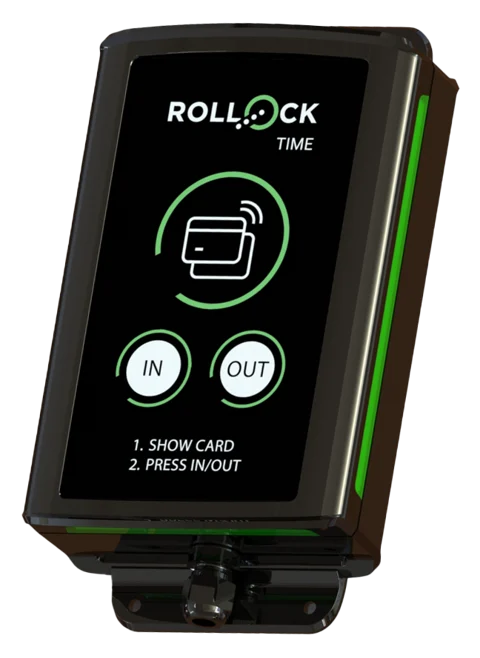
The NFC key fob ID the punch clock uses to identify the employee. Added by showing the key to the device.
A dedicated view for everyone
Employee
- Start and Stop with a single tap
- Times freely as text – the app calculates
- Your own hours and balance visible
- Clock in at the device too, with your own key
Supervisor
- Employees, work sites and key fobs
- Entry method per employee
- Who is at work right now
- Period approval and locking, corrections with reasons
- Leave requests, absences and flexitime balances
- Email invitations and reminders
Payroll and invoicing
- Pay types according to the collective agreement (20 collective agreements)
- Procountor and Netvisor integration on request (€10/mo)
- Annual leave records and leave days as pay types
- Dedicated read-only login for your accounting firm
- Hours per employee and per period
- Invoicing per site and per project with your own rates
- Excel and CSV file with pay type codes
- Working-time records ready for inspection
New: part-timers, balances and easy switching
Guides with videos
Part-timers, additional work and mid-week public holidays
Working days and daily working time per employee, additional work before overtime, public holiday compensation and Saturday shifts as a full day.
Flexitime balance at once and leave according to the collective agreement
The employee sees their flexitime balance in the clock-in view. Leave accrual and holiday bonus according to the chosen collective agreement.
Old timesheets, opening balances and support
We migrate your old timesheets for you. You can paste a screenshot straight from the clipboard into a support request.
Install on your phone – without an app store
The app is installed straight from the browser to the home screen. It opens full screen from its own icon like any other app, and there are no updates to download.
Android
- Open leimauslaite.fi/app in Chrome and log in
- Tap Install app – or from the menu Install app / Add to Home screen
- Also clock in by tapping the work site's NFC tag
iPhone
- Open leimauslaite.fi/app in Safari and log in
- Tap the Share icon and choose Add to Home Screen
- Clock in with the Start/Stop button or at the punch clock
Read more about mobile clock-in → Reading NFC tags with a phone works in Chrome on Android. The iPhone browser does not support NFC, so on iPhone you clock in with the button or at the punch clock.
New
Approval, collective agreements, leave and flexitime – now included
Hours are checked, approved and locked – and pay types are calculated according to the collective agreement you choose.
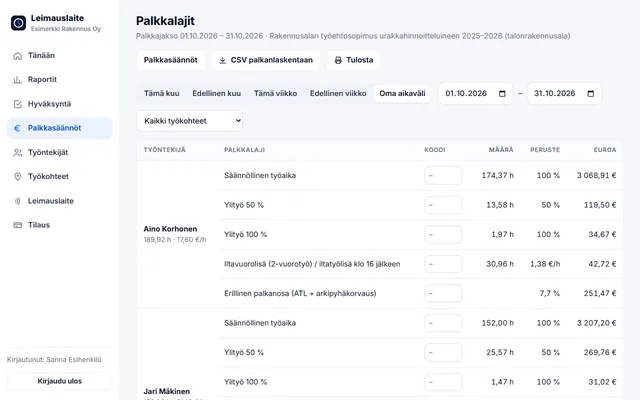
Collective agreement rules: pay types ready to go
Choose from the 20 most common collective agreements. Overtime, Sunday and public holiday work, and evening, night and Saturday supplements are calculated from the punches – CSV for payroll. You can request a missing collective agreement.
Explore collective agreement rules →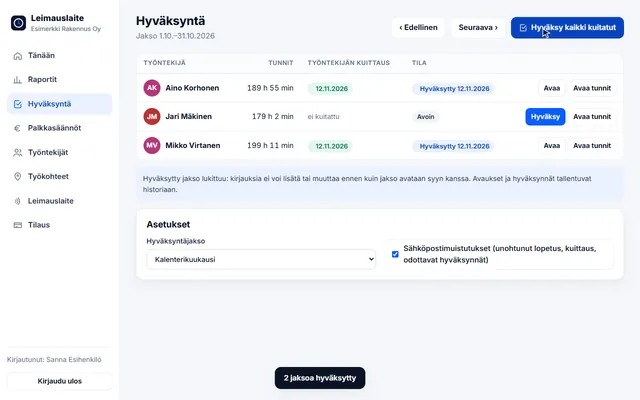
Approval, locking and reminders
The employee confirms their hours, the supervisor approves them and the period is locked. Email reminders flag forgotten clock-outs and pending approvals.
See how it works →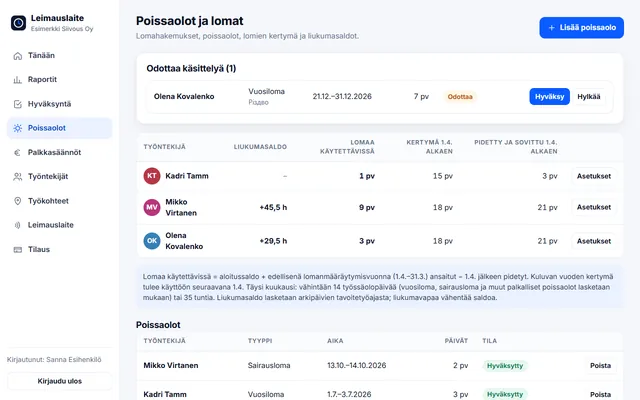
Leave, absences and flexitime
Leave accrual under the Annual Holidays Act, leave requests by phone and a flexitime balance within the limits of section 12 of the Working Hours Act (+60 h / −20 h).
Read how it is calculated →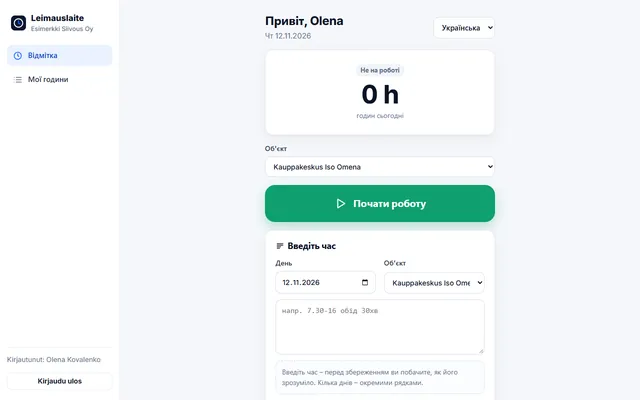
NFC tag, 5 languages and accounting firm
Clock in by tapping the work site's NFC tag with an Android phone. Employee view in Finnish, English, Estonian, Russian and Ukrainian. Read-only login for your accounting firm.
Explore →Try it for free – 1–3 employees always free of charge
Add employees and work sites, choose the entry method and the hours start adding up. No card details, no commitment.