Blog · 15 Nov 2026
Part-timers, additional work and mid-week public holidays: working hours per employee
When some employees work 80% of full time and someone else works 6.5-hour days, full-time rules calculate incorrectly: additional work shows up as overtime, too many sick days are counted and public holidays are forgotten. Now working time is defined separately for each employee.
Working time per employee
Open the employee and select Working time: part-time, working days and leave balances. Choose the working days (Mon–Sun) and the working time per day. The app shows the weekly working time and the share of full time, for example 30 h · 4 days (80% / 37.5 h).
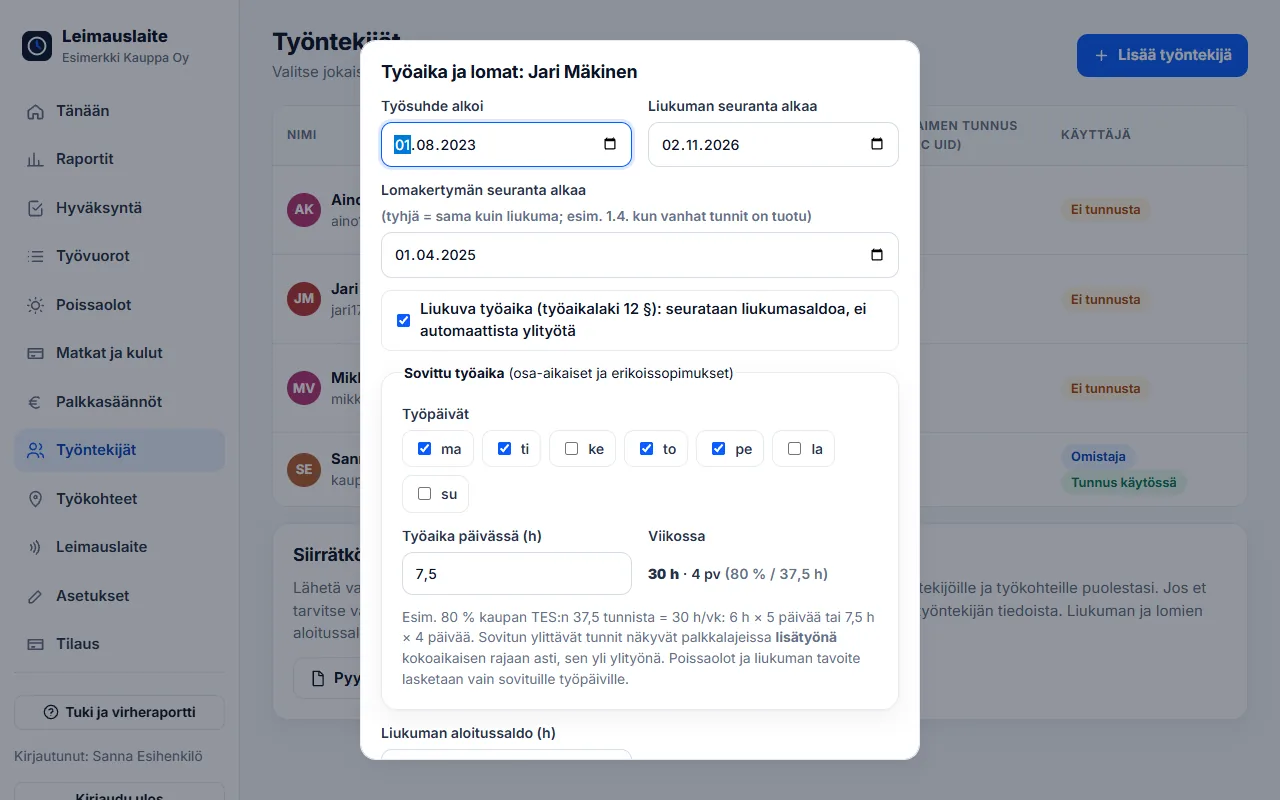
What does working time affect?
- Additional work: hours exceeding the agreed weekly working time up to the full-time limit appear as a separate line in the pay types at the basic hourly wage – only hours beyond that count as overtime
- Absences: sick days and other absence days are counted only for agreed working days
- Flexitime: the daily target applies only to agreed working days, at the agreed length
- Leave: if there are no more than 3 working days per week, the 35-hour rule is applied automatically
Public-holiday system
For example, in the public-holiday system of the retail collective agreement, a public holiday falling between Monday and Friday shortens the week by one day, and public-holiday compensation is paid for it: 7.5 h for full-time employees and weekly hours / 5 for part-time employees. Turn the system on on the Pay rules page. The app recognises reducing public holidays from the calendar: New Year's Day, Epiphany, Good Friday, Easter Monday, May Day, Ascension Day, Midsummer Eve, Independence Day, Christmas Eve, Christmas Day and Boxing Day.
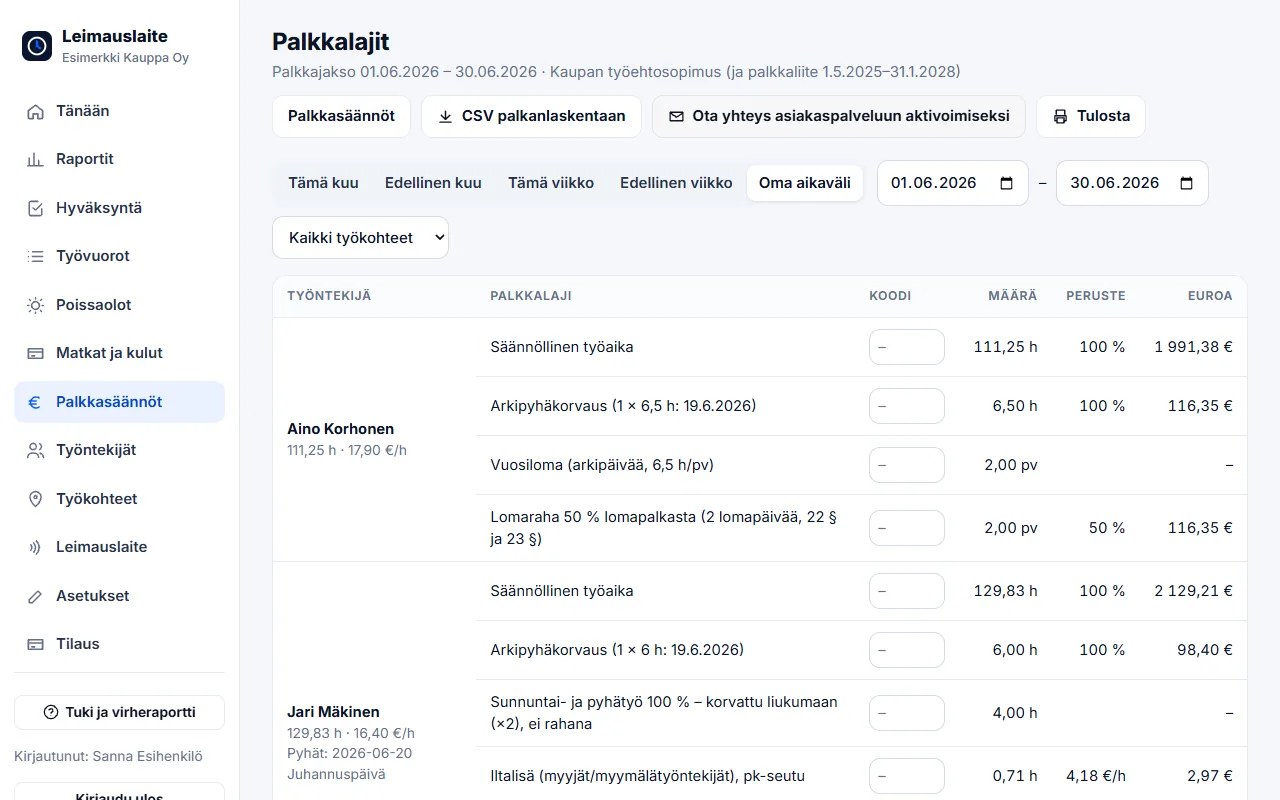
Saturday shift and Sunday work
Many shops have agreed that a short Saturday shift (e.g. 10:00–14:00) counts as a full weekday. When the setting is on, the actual time is recorded in the working-time records, but flexitime and pay types are credited with at least the employee's agreed daily working time. Longer days, such as trade fairs, are counted as actual hours.
For flexitime users, Sunday and public-holiday work increases the balance double by default, in which case the Sunday increment is not paid in money. The setting can be turned off in Pay rules.
FAQ
How do I create a part-time employee?
Add the employee as usual, open their details and select Working time: choose the working days and the working time per day. For example, 80% of the retail collective agreement's 37.5 hours is 6 h × 5 days or 7.5 h × 4 days.
What is the difference between additional work and overtime?
Work exceeding a part-time employee's agreed working time is additional work up to the full-time limit, and it is paid at the basic hourly wage. Only work beyond the full-time limit is overtime.
How much public-holiday compensation does a part-time employee get?
In the public-holiday system of the retail collective agreement, a part-time employee receives their weekly working hours divided by five for each reducing public holiday – for example 6 h for a 30-hour week.
Read also
- Collective agreement rules in time tracking: pay types straight from clock-ins
- Approving and locking working hours: how to close a period correctly
- Calculating overtime and Sunday work under the Working Hours Act – examples
- Evening, night and Saturday supplements 2026: 20 collective agreements compared
- Email reminders and invitations: a forgotten clock-in no longer surprises you on payday
- Annual leave accrual and flexitime balance: how the app calculates them by law
- Old timesheets, opening balances and support: how to switch time tracking systems
- Clocking in with phone NFC, five languages and a login for your accounting firm
- Shift roster under the Working Hours Act: create, publish and compare with actual hours
- Building-site personnel list and employee report to the Finnish Tax Administration directly from clock-ins
- Mileage allowance and daily allowances 2026: trips and expenses in time tracking
- Kiosk mode, projects and billing by site – and security in order
- Time tracking in staffing: hours by client for billing and payroll
- Time tracking in construction: Valtti card, building sites and the construction collective agreement
- Time tracking in cleaning: NFC tags at sites and hours by site
- Time tracking in property maintenance: tags in properties and on-call duty made visible
- Time tracking in retail: evening and Saturday supplements under the retail collective agreement
- Time tracking in restaurants: night shifts, period-based work and the MaRa collective agreement
- Time tracking in care and home services: percentage supplements and public holidays done right
- Time tracking in industry and warehouses: shifts, overtime tiers and collective agreements
- Time tracking in the office: flexitime, remote days, leave and the accounting firm
- Time tracking in transport and logistics: period-based work and terminal shifts
- Time tracking in security services: night shifts, public holidays and period-based work
Try it for free – 1–3 employees always free of charge
Add employees and work sites, choose the entry method and the hours start adding up. No card details, no commitment.