Blog · 12 Nov 2026
Time tracking in staffing: hours by client for billing and payroll
A temp worker may be at three clients in the same week, and each must be invoiced for the right hours and paid according to the right collective agreement. Clock-in at the client site by phone, NFC tag or kiosk – hours by client for invoicing and as pay types weekly.
What does staffing need from time tracking?
- Timesheets arrive from clients by email, in different formats and late
- The same hours are entered twice: for invoicing and for payroll
- Overtime, supplements and part-timers' additional work are calculated by hand according to the client's collective agreement
Example day
A temp worker starts Monday at a warehouse client's site and clocks in by tapping the NFC tag next to the door. On Thursday they move to a retail client, where clock-ins are made on a kiosk tablet with a PIN code. On Monday, the client's contact person approves the previous week's hours with their own login, and the staffing company prints a billing report for the client by site and by employee. Pay types are calculated according to each client's collective agreement.
Features used in staffing
- Clients as work sites. Each client or location is its own work site with its billing rates. The employee chooses the site when clocking in or taps the site's NFC tag with their phone.
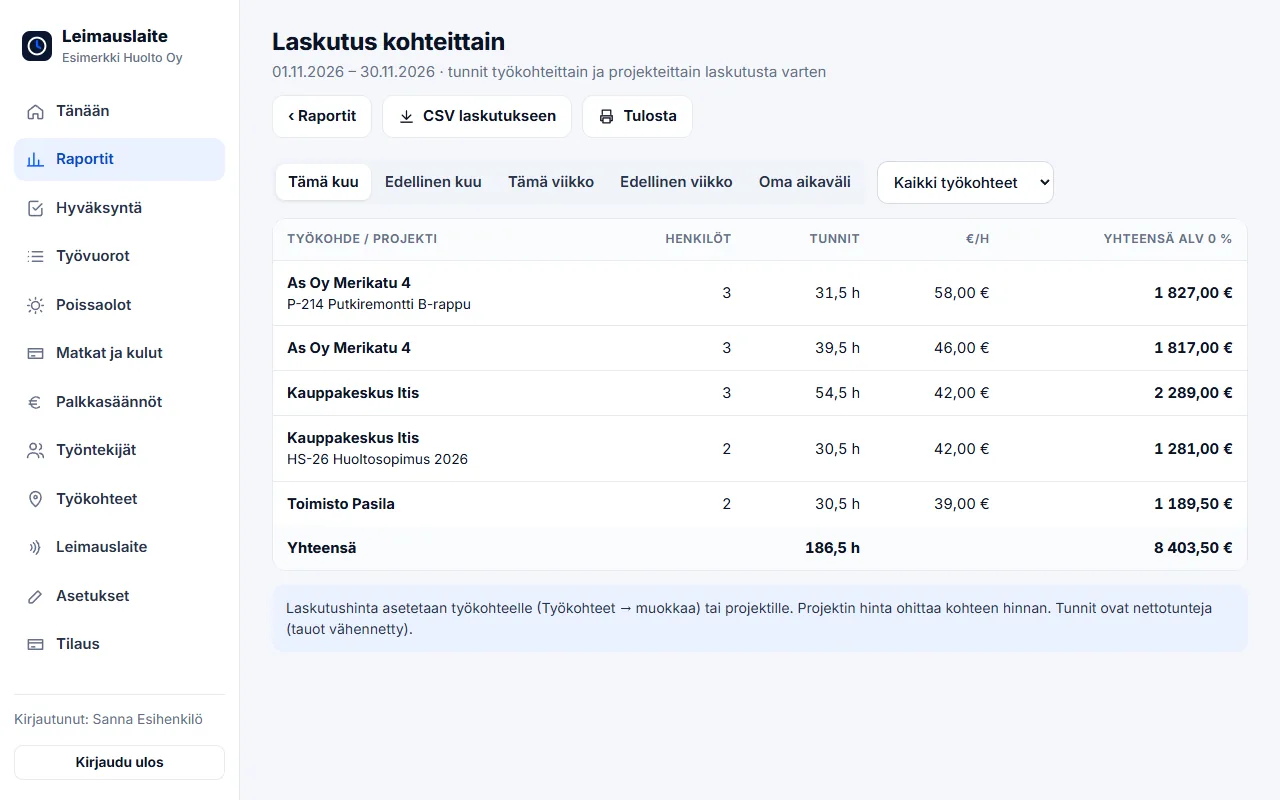
- Billing report for the client. A report per client company: sites and employees, in summary or with a daily breakdown. Overtime and Sunday work are billed with their own multipliers (e.g. 150% and 200%).
- Client approval. The client's contact person approves their site's weekly hours with their own login or returns them for correction.
- Weekly approval and locking. The employee confirms, the supervisor approves and the period is locked. The approval period can be one week for weekly pay.
- User company's collective agreement by site. The client's collective agreement is selected for the work site, and pay types are calculated accordingly – the same employee can work at sites under two different collective agreements in the same week.
- Five languages. Employee view, invitation and reminders in Finnish, English, Estonian, Russian or Ukrainian.
- Building sites and Tax Administration report. With the staffing company as the employer: personnel list and employee report to the Tax Administration straight from clock-ins.
Collective agreement and pay types
Collective agreement for the retail sector (and pay appendix 1.5.2025–31.1.2028)
01.02.2025–31.01.2028 · Overtime over 10 h / day and 37.5 h / week · Sun/public holiday +100%
- Evening supplement (sales staff/shop employees), Helsinki region: €4.18/h (Mon, Tue, Wed, Thu, Fri, Sun 18:00–24:00)
- Night supplement (sales staff), Helsinki region: €6.28/h (Mon, Tue, Wed, Thu, Fri, Sat 00:00–06:00)
- Saturday supplement (sales staff), Helsinki region: €5.46/h (Sat 13:00–24:00)
Collective agreement for warehouse terminal and port workers in the freight forwarding sector
11.04.2025–29.02.2028 · Overtime over 8 h / day and 40 h / week · Sun/public holiday +100%
- Evening work supplement: 15.00% (every day 16:00–22:00)
- Night work supplement: 25.00% (every day 22:00–06:00)
Collective agreement for the construction industry, including piecework pricing, 2025–2028 (house building)
01.03.2025–29.02.2028 · Overtime over 8 h / day and 40 h / week · Sun/public holiday +100%
- Evening shift supplement (2-shift work) / evening work supplement after 16:00: €1.38/h (every day 16:00–23:00)
- Night shift supplement / night work supplement after 23:00: €2.58/h (every day 23:00–06:00)
Collective agreement for employees in the property services sector
01.04.2025–31.03.2028 · Overtime over 8 h / day and 40 h / week · Sun/public holiday +100%
- Evening supplement (other than regular shift work): €0.73/h (every day 18:00–23:00)
- Night supplement (other than regular shift work): €1.36/h (every day 23:00–06:00)
Collective agreement for the tourism, restaurant and leisure services sector – EMPLOYEES
01.04.2025–31.03.2028 · Period-based work 120 h / 3 weeks · Sun/public holiday +100%
- Evening work supplement: €1.40/h (every day 18:00–24:00)
- Night work supplement: €2.37/h (every day 00:00–06:00)
Collective agreement for the food industry
14.04.2025–31.01.2028 · Overtime over 8 h / day and 40 h / week · Sun/public holiday +100%
- Evening work supplement (not shift work): €2.15/h (every day 16:00–23:00)
- Night work supplement (not shift work): €4.31/h (every day 23:00–06:00)
- Early morning hours compensation: 100.00% (every day 00:00–06:00)
Onboarding in 15 minutes
- Create a free account and add work sites.
- Add employees, choose the recording method and language – the invitation is sent by email.
- On the Pay rules page, choose the collective agreement (or the Working Hours Act) and enter hourly wages if you want euro amounts.
- At the end of the month: employees confirm, the supervisor approves and the pay types are sent as CSV to payroll.
Staffing package: €49/mo + €3.90 per billable employee. We recommend: clients as work sites with billing rates, phone clock-in and NFC tags at client sites, weekly approval and CSV or API for payroll. See also Staffing – overview.
FAQ
Can the same employee work at several clients?
Yes. Each client or location is its own work site, and the employee selects the site when clocking in or taps the site's NFC tag. Reports and invoicing separate the hours by client.
How do the hours get onto the client's invoice?
Give each site an invoicing rate. Reports → Invoicing by site calculates the hours and amounts by client, and the CSV file goes to invoicing. The hours can also be retrieved into your own system via the API.
Whose collective agreement applies?
The user company's collective agreement applies to a temp worker (Employment Contracts Act, chapter 2, section 9). In the app, the collective agreement is selected for the work site, so the same employee's hours are calculated with each client's own collective agreement.
Can the client approve the hours themselves?
Yes. The client's contact person gets their own credentials, with which they see only their own sites' hours week by week and approve them or return them for correction. The approval is shown in the invoicing report, and the supervisor receives an email about it.
What does the Staffing plan cost?
€49 per month and €3.90 for each billable employee, i.e. an employee who has entries during the billing month (excl. VAT). For example, 20 employees cost €127 and 100 employees €439 per month. There is no limit on the number of employees, and a small operator can start at a low cost.
Read also
- Collective agreement rules in time tracking: pay types straight from clock-ins
- Approving and locking working hours: how to close a period correctly
- Calculating overtime and Sunday work under the Working Hours Act – examples
- Evening, night and Saturday supplements 2026: 20 collective agreements compared
- Email reminders and invitations: a forgotten clock-in no longer surprises you on payday
- Annual leave accrual and flexitime balance: how the app calculates them by law
- Part-timers, additional work and mid-week public holidays: working hours per employee
- Old timesheets, opening balances and support: how to switch time tracking systems
- Clocking in with phone NFC, five languages and a login for your accounting firm
- Shift roster under the Working Hours Act: create, publish and compare with actual hours
- Building-site personnel list and employee report to the Finnish Tax Administration directly from clock-ins
- Mileage allowance and daily allowances 2026: trips and expenses in time tracking
- Kiosk mode, projects and billing by site – and security in order
- Time tracking in construction: Valtti card, building sites and the construction collective agreement
- Time tracking in cleaning: NFC tags at sites and hours by site
- Time tracking in property maintenance: tags in properties and on-call duty made visible
- Time tracking in retail: evening and Saturday supplements under the retail collective agreement
- Time tracking in restaurants: night shifts, period-based work and the MaRa collective agreement
- Time tracking in care and home services: percentage supplements and public holidays done right
- Time tracking in industry and warehouses: shifts, overtime tiers and collective agreements
- Time tracking in the office: flexitime, remote days, leave and the accounting firm
- Time tracking in transport and logistics: period-based work and terminal shifts
- Time tracking in security services: night shifts, public holidays and period-based work
Try it for free – 1–3 employees always free of charge
Add employees and work sites, choose the entry method and the hours start adding up. No card details, no commitment.