Time tracking for manufacturing and warehouses
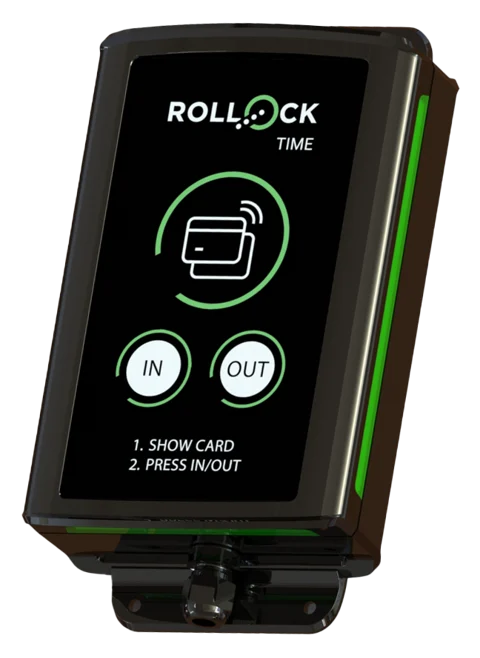
When the shift changes, dozens of employees clock in at the same time. A punch clock at the entrance handles the clock-ins, and overtime is visible in time.
- 1–3 employees free
- No card details
Sound familiar?
- Clock-ins pile up at shift change
- Overtime is only noticed during the pay period
- Temp workers' hours kept separately
How it is solved
- A punch clock at the staff entrance
- NFC key fob or Valtti card, IN and OUT
- Overtime tiers and shift work supplements according to the industry collective agreement
- Report for the staffing agency, view also in English, Estonian, Russian and Ukrainian
We recommend: a punch clock at every entrance.
What manufacturing and warehouses need
Shift change in seconds
A punch clock at the entrance – key fob or Valtti card, IN or OUT.
Industry collective agreements
Technology, chemical and food industries as well as warehouse terminals built in.
Shift work supplements
Evening and night shift supplements are switched on for those doing shift work.
Overtime in time
Overtime tiers (8 h +50%, then +100%) according to the collective agreement – visible already during the period.
Temp workers in their own language
Invitation and view in English, Estonian, Russian or Ukrainian.
Accounting firm and payroll software
Pay types as CSV with your own codes, read-only credentials for the accounting firm.
A typical day
The evening shift starts at 14:00, and thirty employees clock in on the entrance device within a few minutes. Shift work supplements are assigned to the right hours, and the week's 9th overtime hour already shows in the 100% tier. The staffing agency receives a report by employee.
Collective agreement built in
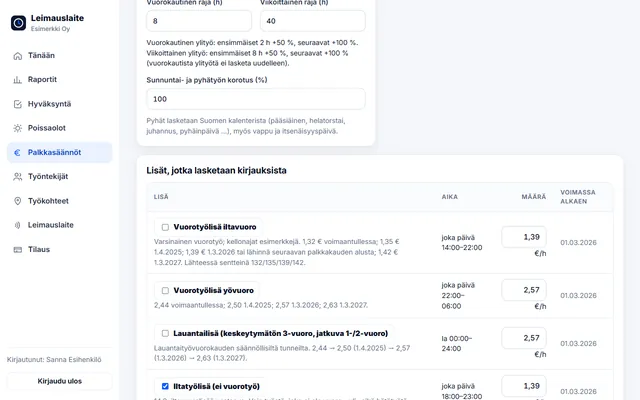
Choose the collective agreement and pay types are calculated from the clock-ins. The euro amounts can be edited. Read about collective agreement rules.
Collective agreement for employees in the technology industry
22.02.2025–30.11.2027 · Overtime over 8 h / day and 40 h / week · Sun/public holiday +100%
- Evening work supplement (not shift work): €1.39/h (every day 18:00–23:00)
- Night work supplement (not shift work): €2.57/h (every day 23:00–06:00)
Collective agreement for the basic chemical industry (workers)
21.02.2025–31.12.2027 · Overtime over 8 h / day and 40 h / week · Sun/public holiday +100%
- Evening work supplement (not shift work): €1.30/h (every day 16:00–24:00)
- Night work supplement (not shift work): €2.43/h (every day 00:00–06:00)
Collective agreement for the food industry
14.04.2025–31.01.2028 · Overtime over 8 h / day and 40 h / week · Sun/public holiday +100%
- Evening work supplement (not shift work): €2.15/h (every day 16:00–23:00)
- Night work supplement (not shift work): €4.31/h (every day 23:00–06:00)
- Early morning hours compensation: 100.00% (every day 00:00–06:00)
Collective agreement for warehouse terminal and port workers in the freight forwarding sector
11.04.2025–29.02.2028 · Overtime over 8 h / day and 40 h / week · Sun/public holiday +100%
- Evening work supplement: 15.00% (every day 16:00–22:00)
- Night work supplement: 25.00% (every day 22:00–06:00)
Try it yourself – click to start work
The real app with sample data. Switch roles in the top bar and view the report by employee and by site.
The demo runs only in this browser, and no data is sent anywhere. Open the demo full screen →
Questions: manufacturing and warehouses
How many punch clocks are needed?
Usually one for each staff entrance. Clocking in takes a few seconds.
Can temp workers be added to the app?
Yes. They are given a key fob or use their Valtti card, and their hours can be shown separately in the report.
Other industries:
Try it for free – 1–3 employees always free of charge
Add employees and work sites, choose the entry method and the hours start adding up. No card details, no commitment.