Blog · 12 Nov 2026 · updated 15 Nov
Annual leave accrual and flexitime balance: how the app calculates them by law
Holiday records and flexitime balances are error-prone in Excel: you have to remember the 14-day rule, the holiday credit year and public holidays. The app calculates them directly from clock-ins and approved absences.
Annual leave accrual (Annual Holidays Act, sections 5–6)
Leave accrues at 2.5 weekdays for each full holiday credit month – or 2 weekdays if the employment has lasted less than a year by the end of the holiday credit year (31 March). The holiday credit year runs from 1 April to 31 March, and a fraction of a day is rounded up.
A month is full when the employee has accumulated at least 14 days at work. If, under their contract, the employee works on so few days that 14 days are not reached, a full month is 35 working hours (the 35-hour rule). Time equivalent to time at work includes, for example, annual leave and paid sick leave.
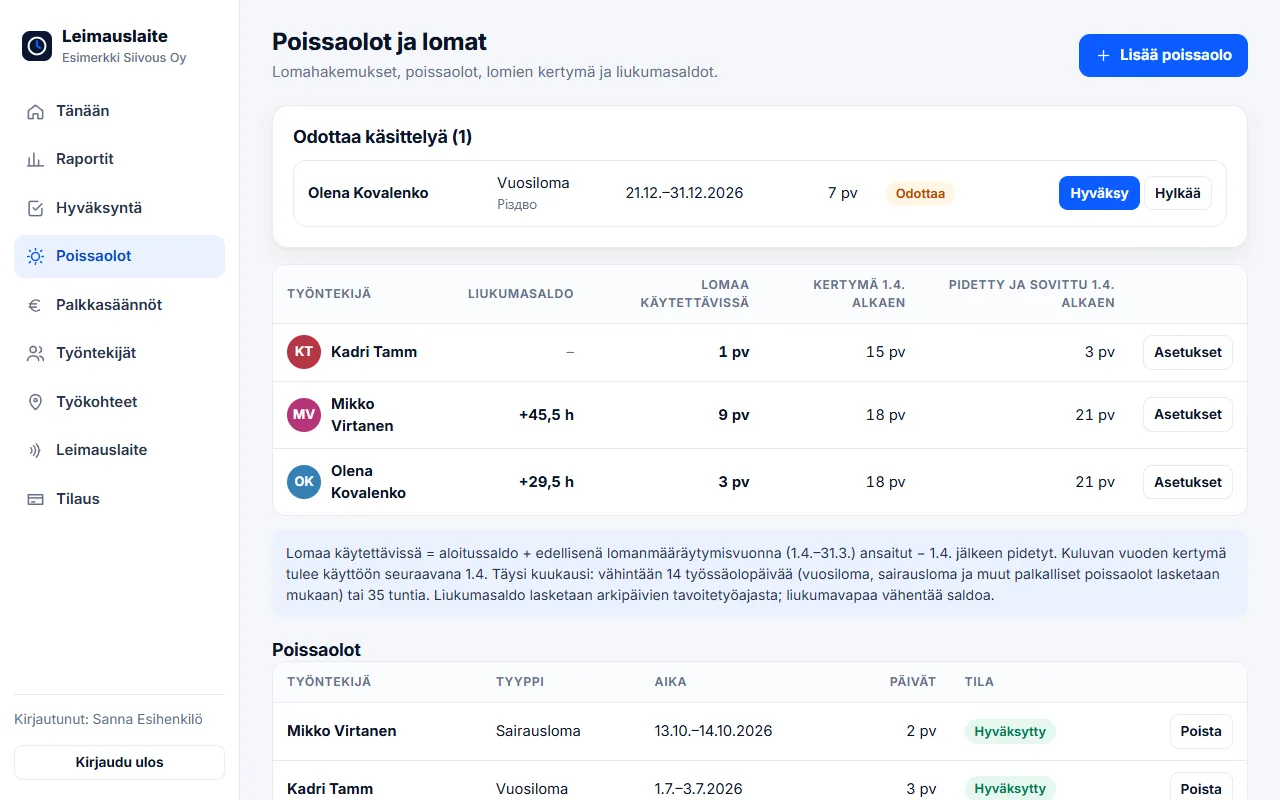
What does the app calculate?
- Full months from clock-ins (14 days or 35 hours) – leave and sick leave are counted in
- Accrual for the current and previous holiday credit year, 2 or 2.5 days / month depending on the start of employment
- Leave days taken as weekdays (Mon–Sat, excluding public holidays and holiday eves)
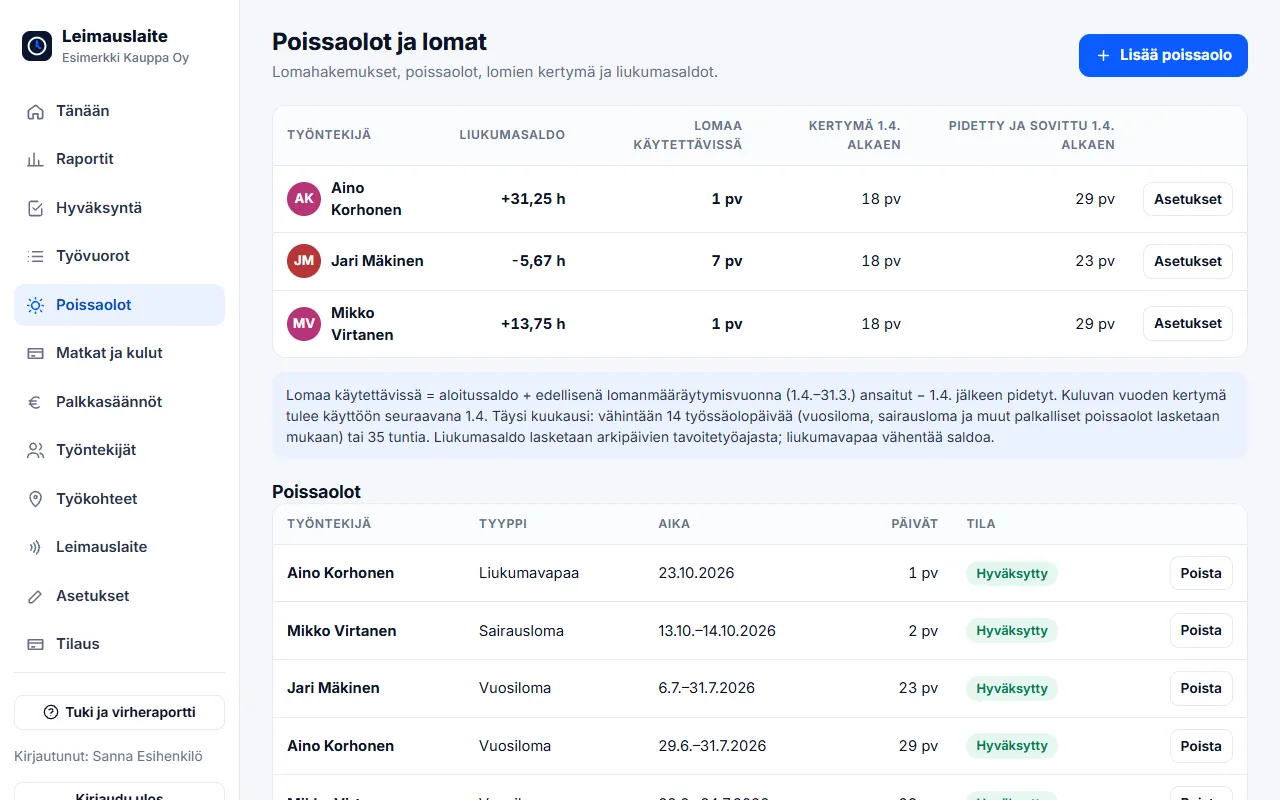
- Leave available = opening balance + previous year's accrual − days taken
- Leave days on their own row in the pay types report
Leave request by phone
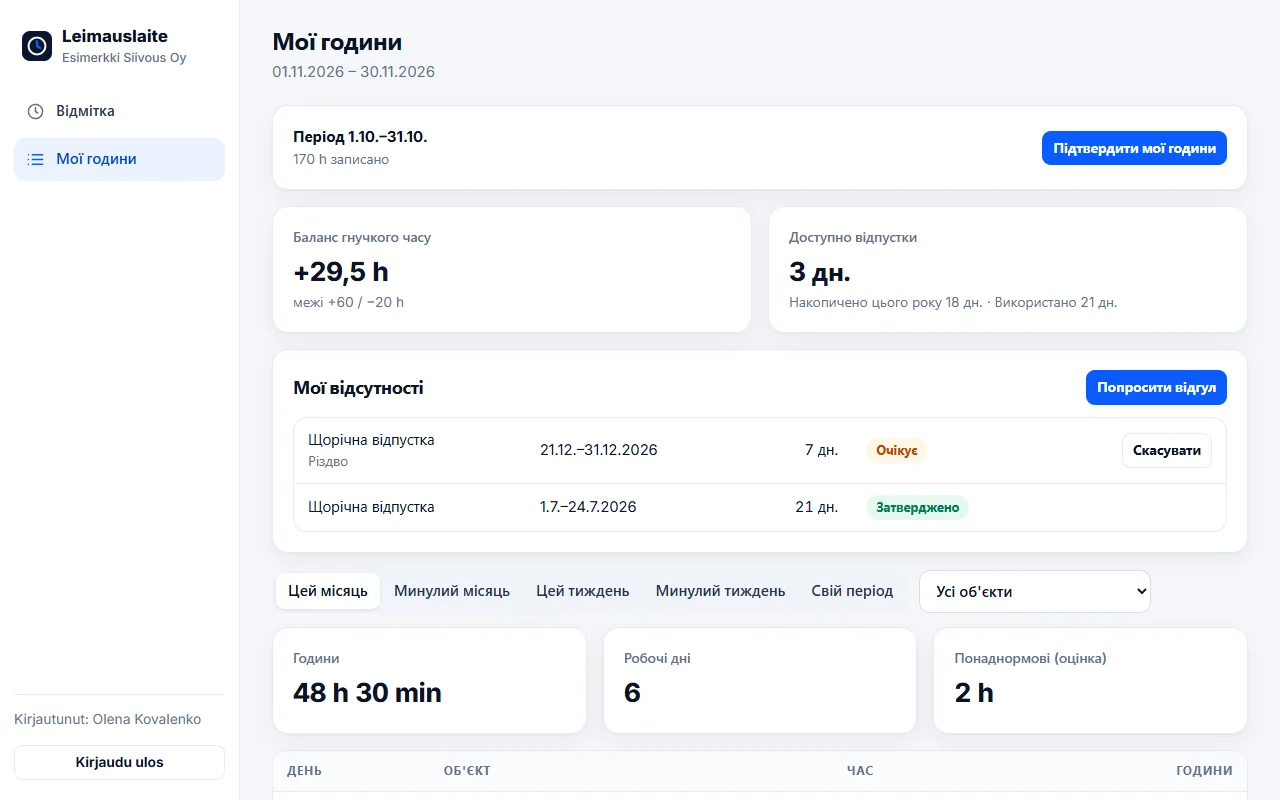
The employee requests leave, flexi leave or unpaid leave from their own view. The supervisor receives an email, approves or rejects the request with one click, and the employee is notified of the decision. Sick leave and other absences are recorded by the supervisor.
Flexible working hours (Working Hours Act, section 12)
With flexible working hours, the employee decides within agreed limits when the working day starts and ends. The law allows a daily flexible range of up to four hours, and weekly working hours may average 40 hours over a four-month follow-up period. At the end of the follow-up period, accumulated surplus hours may be at most 60 hours and deficit hours at most 20 hours.
The app calculates the balance for every weekday: hours worked minus the daily target (e.g. 7.5 h). Public holidays and approved absences do not create a deficit, but flexi leave reduces the balance – as it should. Exceeded limits are highlighted.
Employees see their flexitime balance immediately
An employee on flexitime sees their balance immediately in the clock-in view below the clock, not only on payday. The balance updates while they work: yesterday's balance, plus today's hours worked, minus today's target. So at any moment the balance shows where they would stand if they stopped working now. For flexitime users, the balance also replaces the overtime estimate in the My hours and Reports views.
Annual leave according to the selected collective agreement
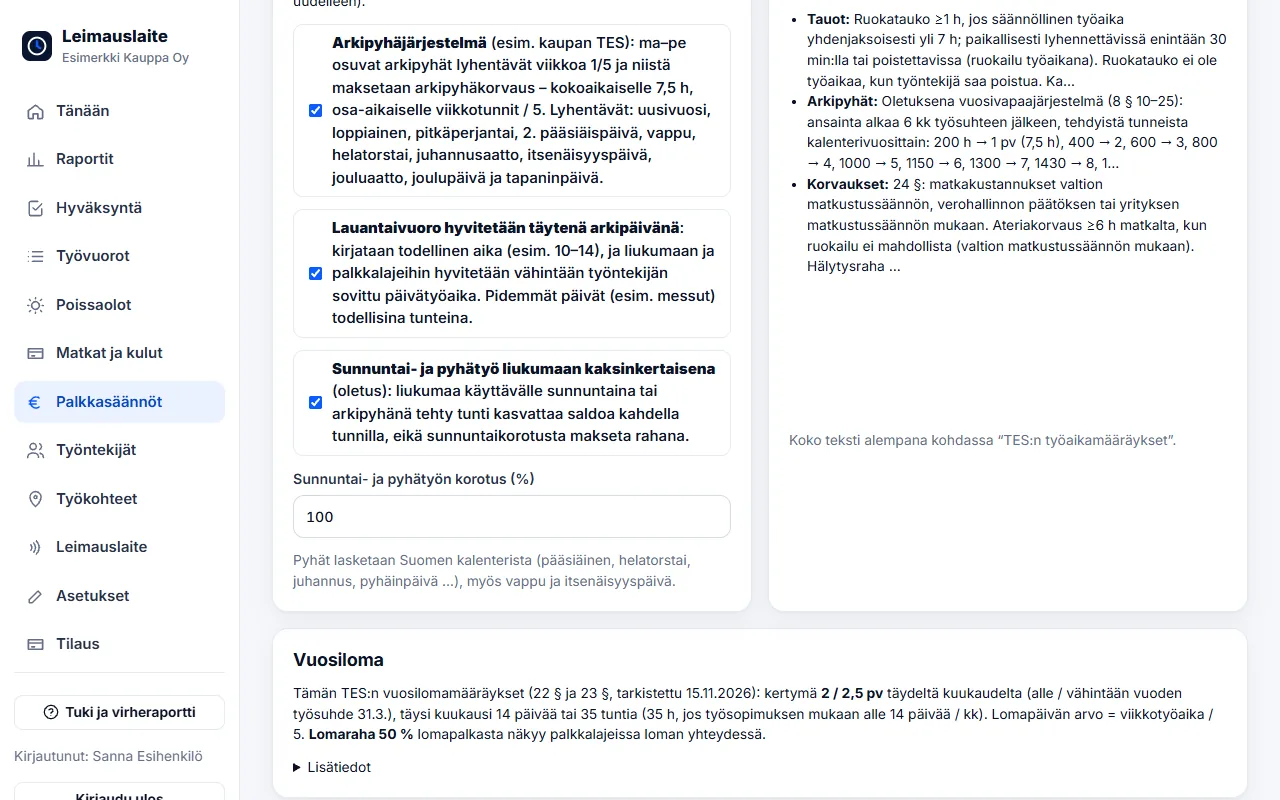
Leave accrual and holiday bonus depend on the collective agreement. The app uses the annual leave provisions of the selected collective agreement, checked against the agreement texts. For example, under the retail collective agreement:
- leave accrues at 2 / 2.5 days per full month (14 days or 35 hours)
- value of a leave day in hours = agreed weekly working time / 5 – correct for part-time employees
- the holiday bonus of 50% of holiday pay appears in the pay types together with the leave
- in private social and health care, leave is calculated in leave days (Mon–Fri) from the collective agreement tables; in construction, holiday pay is a percentage of wages
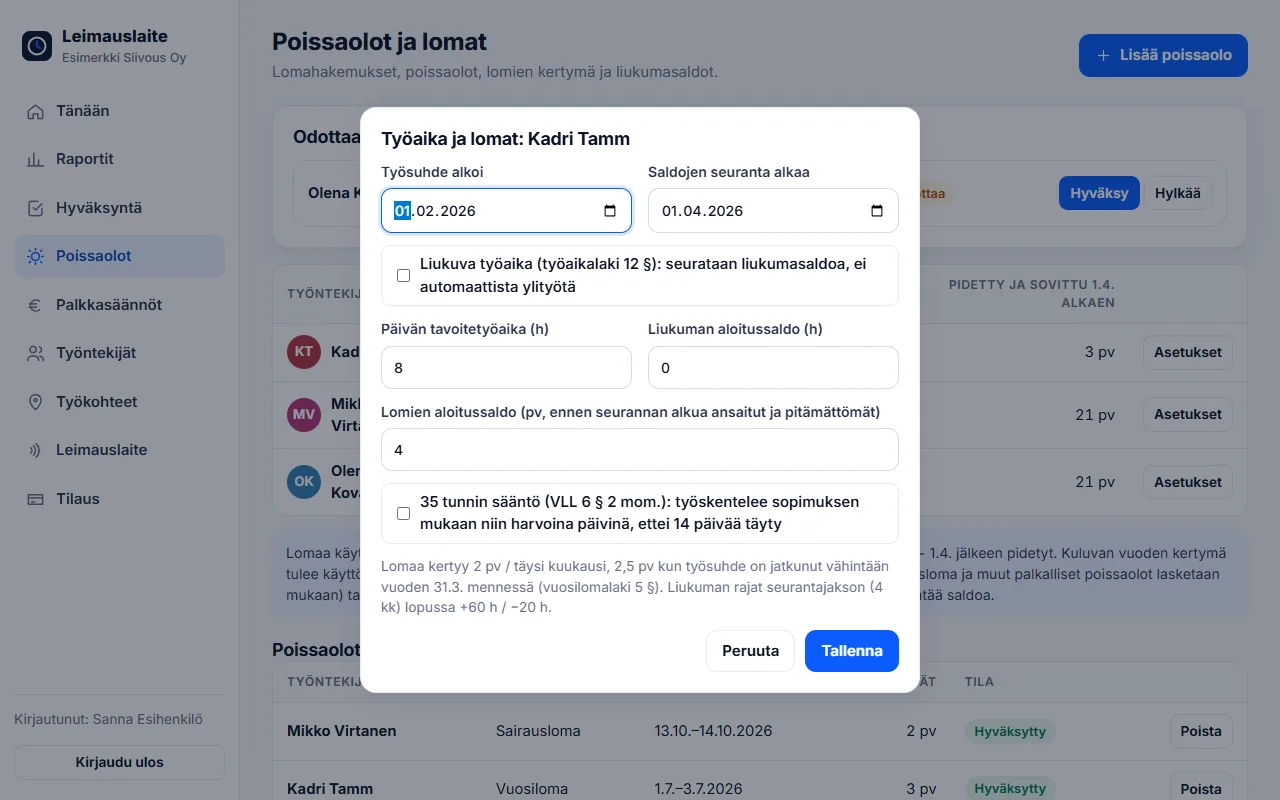
When old hours are transferred from another system, leave accrual tracking can start from a different date than flexitime – for example 1.4.2025, in which case accrual is calculated from the transferred hours. Flexitime days off and public holidays falling on working days count as equivalent to days at work (Annual Holidays Act, section 7).
FAQ
Can employees see their own flexitime balance?
Yes. The balance is shown immediately in the clock-in view and on the My hours page, and it updates while they work.
Does the collective agreement affect leave?
Yes. The app uses the leave provisions of the selected collective agreement: accrual, the value of a leave day and the holiday bonus. For example, in the retail collective agreement the holiday bonus is 50% of holiday pay.
How much leave accrues per month?
2.5 weekdays per full holiday credit month, or 2 weekdays if the employment has lasted less than a year by 31 March (Annual Holidays Act, section 5).
What is a full holiday credit month?
A calendar month in which the employee has accumulated at least 14 days at work, or, if the agreed working days are fewer, at least 35 working hours (Annual Holidays Act, section 6).
How large can the flexitime balance be?
Under section 12 of the Working Hours Act, at the end of the four-month follow-up period the surplus may be at most 60 hours and the deficit at most 20 hours.
Read also
- Collective agreement rules in time tracking: pay types straight from clock-ins
- Approving and locking working hours: how to close a period correctly
- Calculating overtime and Sunday work under the Working Hours Act – examples
- Evening, night and Saturday supplements 2026: 20 collective agreements compared
- Email reminders and invitations: a forgotten clock-in no longer surprises you on payday
- Part-timers, additional work and mid-week public holidays: working hours per employee
- Old timesheets, opening balances and support: how to switch time tracking systems
- Clocking in with phone NFC, five languages and a login for your accounting firm
- Shift roster under the Working Hours Act: create, publish and compare with actual hours
- Building-site personnel list and employee report to the Finnish Tax Administration directly from clock-ins
- Mileage allowance and daily allowances 2026: trips and expenses in time tracking
- Kiosk mode, projects and billing by site – and security in order
- Time tracking in staffing: hours by client for billing and payroll
- Time tracking in construction: Valtti card, building sites and the construction collective agreement
- Time tracking in cleaning: NFC tags at sites and hours by site
- Time tracking in property maintenance: tags in properties and on-call duty made visible
- Time tracking in retail: evening and Saturday supplements under the retail collective agreement
- Time tracking in restaurants: night shifts, period-based work and the MaRa collective agreement
- Time tracking in care and home services: percentage supplements and public holidays done right
- Time tracking in industry and warehouses: shifts, overtime tiers and collective agreements
- Time tracking in the office: flexitime, remote days, leave and the accounting firm
- Time tracking in transport and logistics: period-based work and terminal shifts
- Time tracking in security services: night shifts, public holidays and period-based work
Try it for free – 1–3 employees always free of charge
Add employees and work sites, choose the entry method and the hours start adding up. No card details, no commitment.